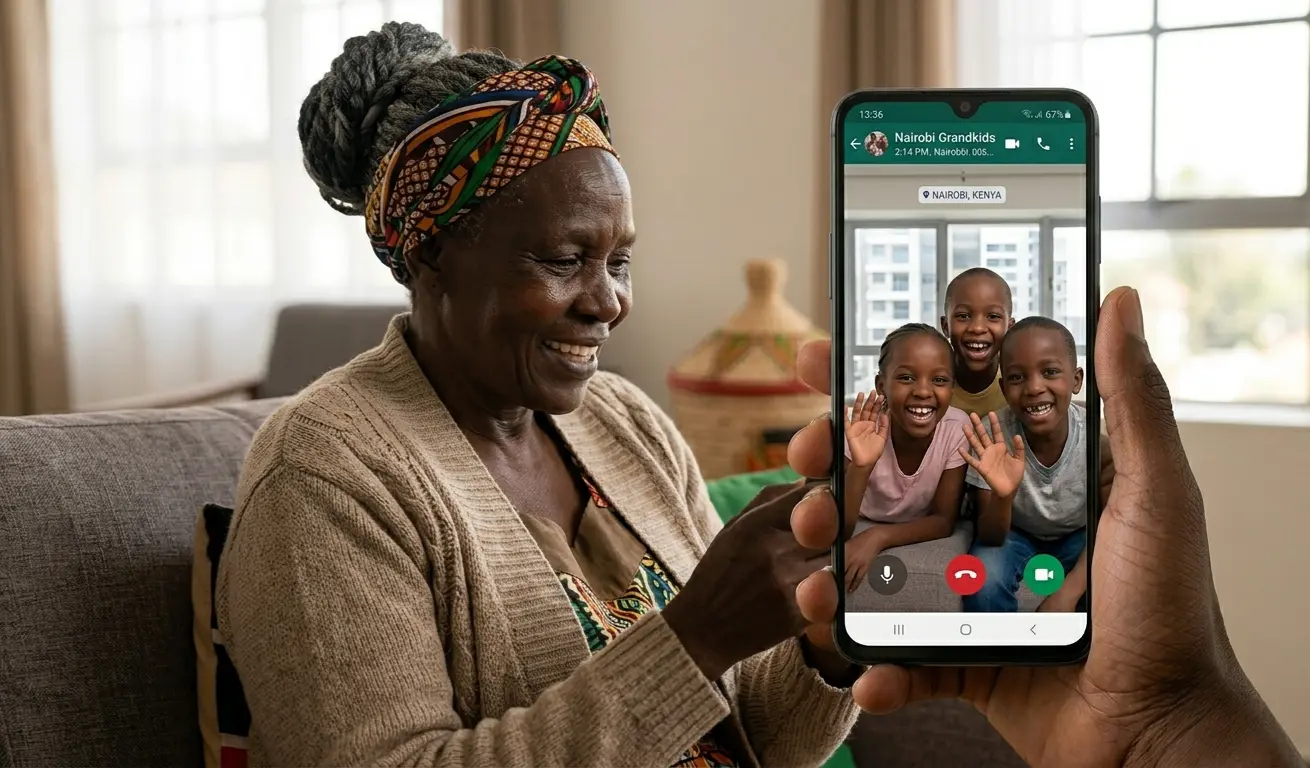
What is WhatsApp and how do Kenyan seniors use it? WhatsApp is a free messaging app that lets you send voice notes, make video calls, join family groups, and share photos — all using internet data instead of expensive airtime. Kenyan older adults use it to connect with grandchildren in Nairobi, join church chama groups, and coordinate family events without leaving home.
📋 In This Article
"My grandchildren are in Nairobi. I am in Nakuru. Before WhatsApp, I spent KSh 500 a month on calls just to hear their voices. Now I see their faces every Sunday afternoon — for free." — Mama Grace, 68, Nakuru.
Many Kenyan older adults have heard about WhatsApp from their children, church members, or friends. Some are already using it. Others feel nervous about getting started — worried about pressing the wrong button, spending too much data, or falling victim to a scam.
Those concerns are completely normal. And they are also completely manageable. This guide was written for you — not for technology experts, not for young people who already know everything, but for older Kenyans who want to stay connected with their families and communities without feeling confused or unsafe.
We will cover everything step by step. You do not need to learn it all at once. Start with one section today. Come back for the rest next week. Technology is simply a tool — and you are perfectly capable of learning this one.
WhatsApp is Kenya's most widely used communication app — not just among young people, but across all generations. With over 3 billion users worldwide, it has become the digital equivalent of the village square: a place where families gather, news travels, and relationships are maintained.
For older Kenyans specifically, WhatsApp offers something valuable that traditional phone calls cannot always provide: connection without cost. Calling a grandchild in Nairobi using airtime can cost KSh 3–5 per minute. A WhatsApp voice note or call using Wi-Fi costs nothing beyond the internet connection you may already have.
What WhatsApp Allows You to Do
- Send and receive voice messages without typing a single letter
- Video call grandchildren, children, and friends — seeing their faces in real time
- Join family, church, chama, and community groups to stay informed
- Share photos of events, celebrations, and daily life
- Communicate in Kiswahili, English, Dholuo, Kikuyu, Kalenjin, or any language you prefer
- Stay connected even when family members are overseas in diaspora
Where Kenyan Culture and WhatsApp Meet
Kenyan culture is built on relationships. The values of harambee, Ubuntu, and community care are not digital concepts — they are deeply human ones. WhatsApp simply gives those values a digital home. Many older Kenyans already use it to organise harambees, coordinate school fee contributions, support bereaved families, and share church announcements.
Studies across sub-Saharan Africa consistently show that when older adults join WhatsApp family groups, they report feeling less lonely and more informed about family news. Connection is the greatest benefit — the technology is just the vehicle.
If WhatsApp is not yet on your phone, here is exactly how to get it. Ask a grandchild or trusted family member to sit with you the first time — it helps to have someone nearby.
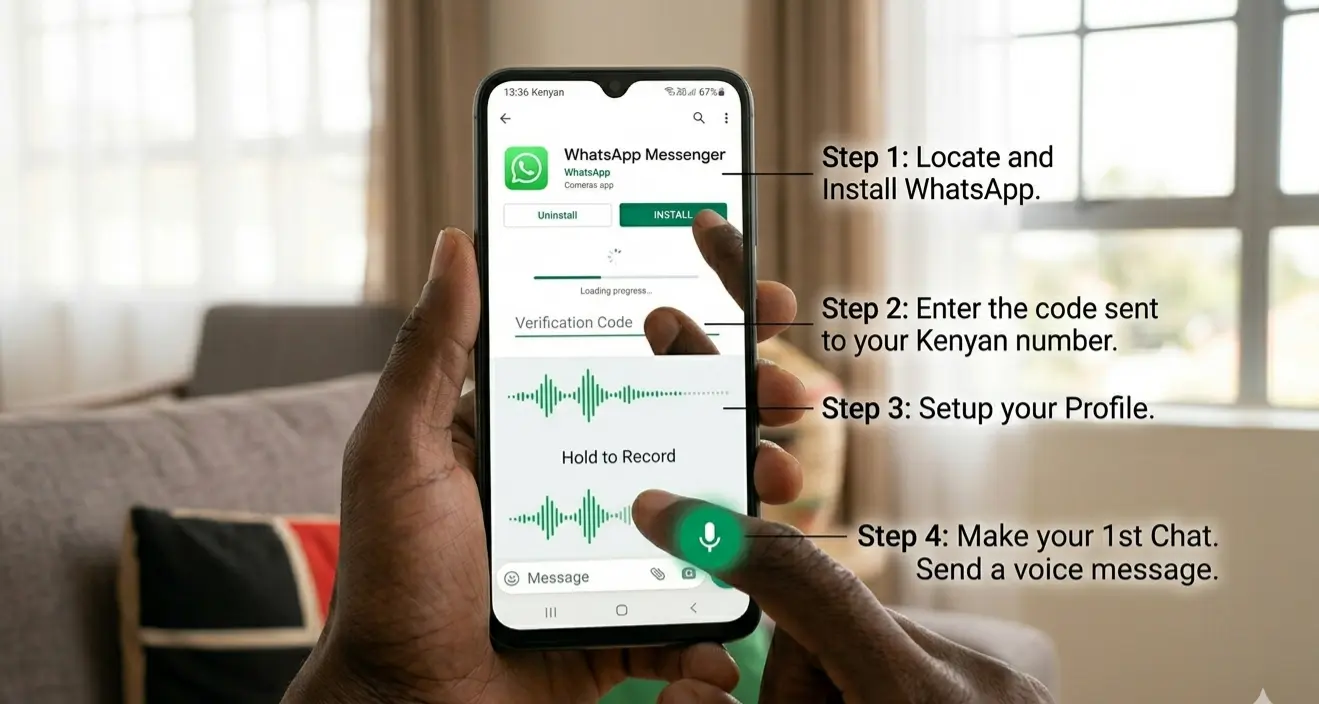
Before using WhatsApp, increase the text size so everything is easier to read. In WhatsApp: Settings → Chats → Font Size → Large. On your phone: Settings → Display → Font Size → increase to your comfort.
If you remember nothing else from this guide, remember this: you never have to type on WhatsApp. Voice notes — spoken audio messages — are the feature that makes WhatsApp ideal for older adults. No keyboard, no spelling, no autocorrect disasters. Just speak, and your family hears your voice.
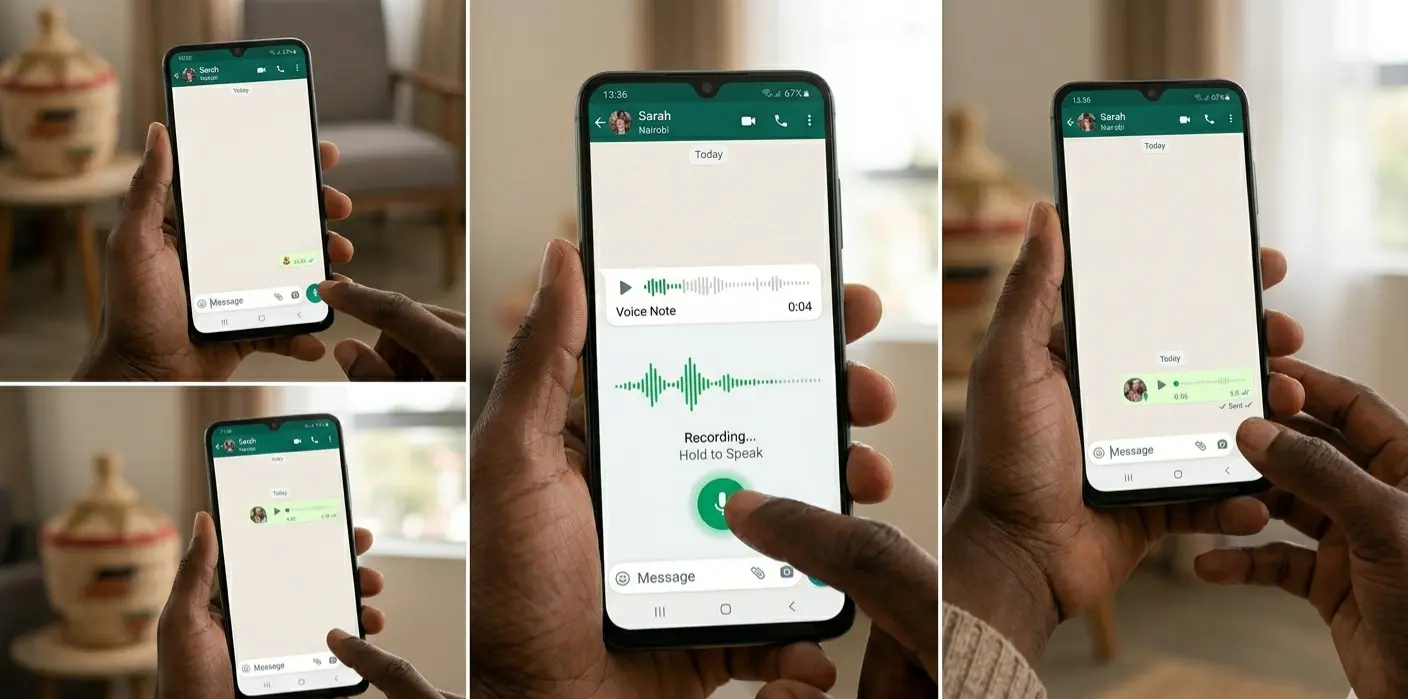
How to Send a Voice Note
Why Voice Notes Are Especially Good for Older Adults
- No typing required — ideal if your fingers are stiff, have arthritis, or if the screen keyboard feels small
- Your loved ones hear your actual voice — the warmth, the laughter, the love in your tone
- Perfect for those with reduced eyesight who find reading small text difficult
- You can listen to voice notes at any time, replaying them as many times as you wish
- Voice notes use less data than video calls, making them budget-friendly
If you record a voice note by mistake, slide your finger left while still holding the microphone button — this cancels the recording before it sends. You can then try again.
A phone call lets you hear family. A video call lets you see them. For grandparents and grandchildren separated by distance — whether across Nairobi or across continents — WhatsApp video calls create moments that matter deeply.

How to Make a Video Call
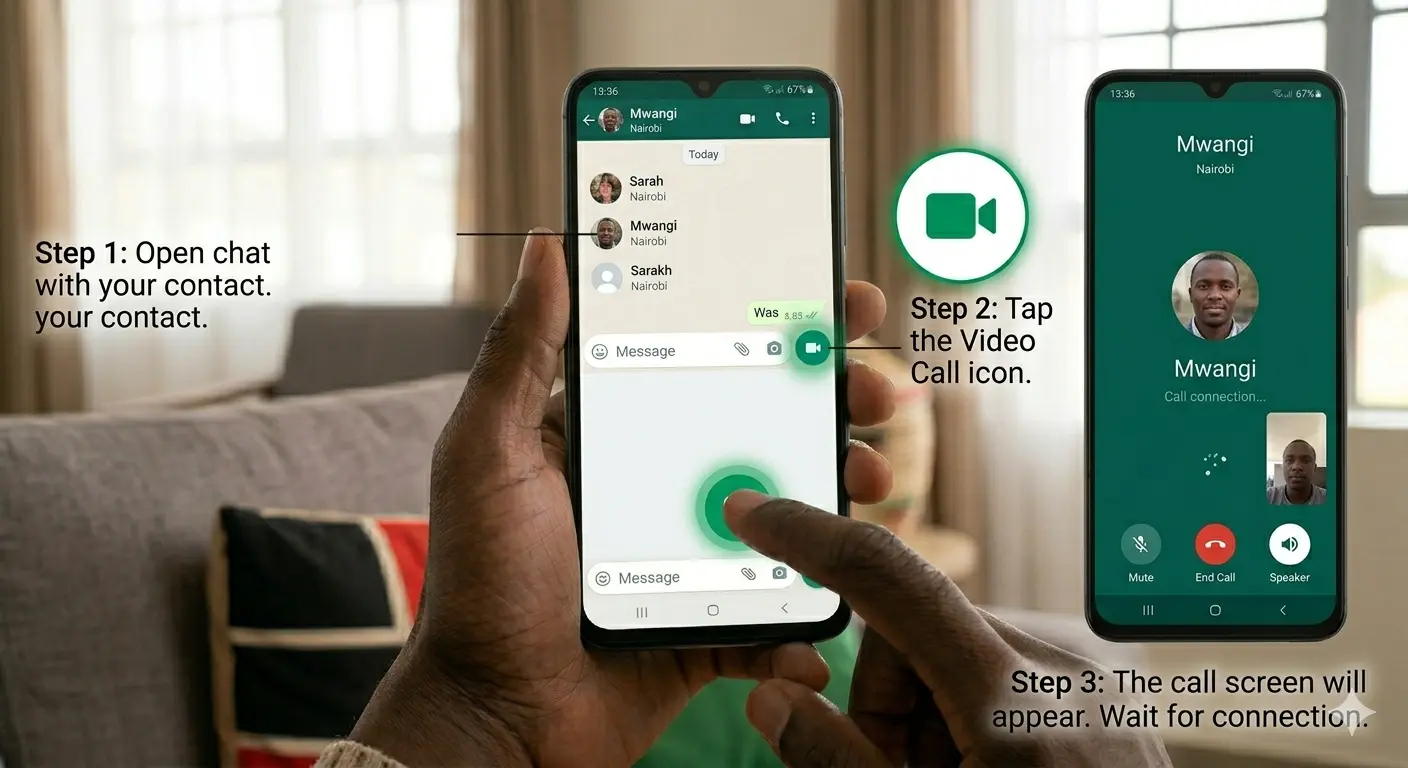
Tips for Better Video Calls
- Sit in a well-lit room — face a window if possible so your face is clearly visible
- Hold your phone steady — prop it against a book or mug if your hands shake
- Use Wi-Fi when available — video calls use more data than voice notes or messages
- Speak clearly and at normal pace — WhatsApp quality is excellent on a good connection
- Older phones may get warm during long calls — this is normal, not dangerous
WhatsApp groups are one of its most powerful features for older Kenyans. A group brings multiple people into one shared conversation — you can see everyone's messages, and everyone can see yours. Family news, church announcements, chama updates, and community welfare information all flow through groups.
Types of Groups Kenyan Seniors Commonly Join
- Family Groups — "Otieno Family" or "Wanjiku Family Updates" — for sharing news, photos, and celebrations
- Church Groups — service times, prayer requests, fellowship announcements
- Chama Groups — meeting reminders, contribution updates, investment discussions
- Village or Estate Groups — local news, security alerts, community events
- Welfare Groups — coordinating support during funerals, illnesses, and harambees
How to Mute a Busy Group (Stop Constant Interruptions)
Some groups send dozens of messages daily. If the notifications become overwhelming, mute the group — you will still receive the messages but your phone will not ring for every one.
- Stay only in groups you trust and that bring you value
- Verify any information before forwarding it — misinformation spreads quickly through groups
- If a group causes you stress or anxiety, you have the right to leave it
- Never share personal financial information in any group
This section may be the most important in the entire guide. WhatsApp scams targeting older adults are common across Kenya. Scammers are sophisticated, convincing, and unfortunately very active on WhatsApp. The good news: once you know what to look for, they are also very easy to identify and avoid.
- A message claiming to be from Safaricom asking for your M-Pesa PIN
- Someone pretending to be from your bank asking for account details
- A message claiming your grandchild is in hospital — "send money urgently!"
- Someone offering you a large prize or business opportunity — "you have won KSh 50,000!"
- A message asking you to share a verification code sent to your phone
- Someone creating extreme urgency and pressure — "you must act now or lose everything"
Always call a trusted family member before sending money to anyone on WhatsApp — no matter how urgent the message sounds. Scammers rely on panic. A single phone call to verify the situation always protects you.
Five Safety Rules Every Kenyan Senior Must Know
Never Share Your M-Pesa PIN
No legitimate company — not Safaricom, not a bank, not a government office — will ever ask for your M-Pesa PIN through WhatsApp or any message.
Never Share Verification Codes
The 6-digit codes WhatsApp sends to your phone are your security keys. If a scammer gets this code, they can take over your account completely.
Call Before Sending Money
Received a message from a relative asking for emergency money? Call them directly first. Always. Every time. A real emergency can wait one minute for you to verify.
Block and Report Suspicious Contacts
Open the suspicious chat → Tap the contact name → Scroll to Block → Tap Report. This removes them and alerts WhatsApp to investigate.
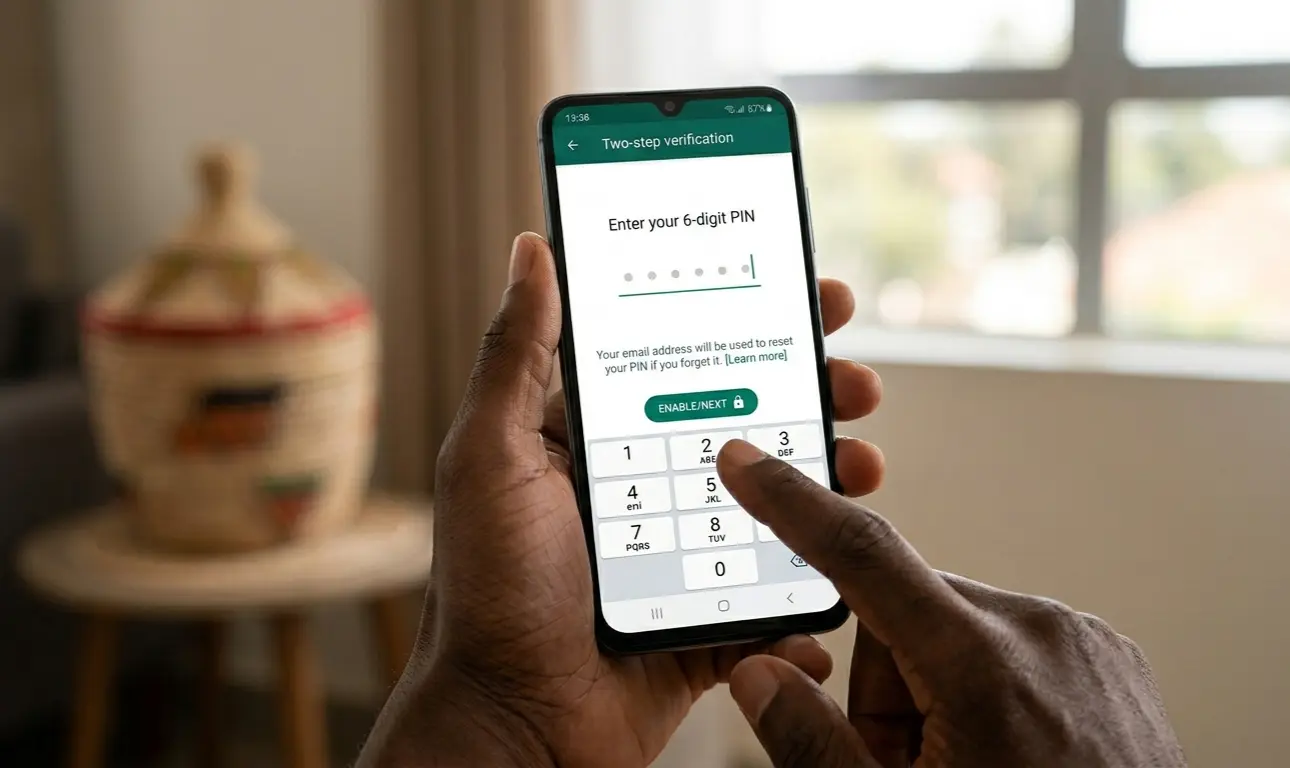
Enable Two-Step Verification
Settings → Account → Two-Step Verification → Enable. This adds a personal PIN that must be entered if anyone tries to access your WhatsApp from another device.
Call Safaricom immediately on 100 (free call). Report the M-Pesa transaction and ask for a reversal request. Also call your bank if a bank transfer was involved. Act quickly — within 30 minutes gives the best chance of recovery. Tell a trusted family member immediately so they can help you.
Two practical concerns that come up most often with older Kenyan WhatsApp users: internet data costs, and text that is too small to read comfortably. Both have simple solutions.
How to Save Internet Data on WhatsApp
- Connect to Wi-Fi whenever possible — at home, at church, at a family member's house. Wi-Fi uses no mobile data.
- Turn off automatic photo and video downloads — go to Settings → Storage and Data → Media Auto-Download → select "Wi-Fi Only" for photos and videos
- Use voice notes instead of videos — a 30-second voice note uses far less data than a 30-second video
- Avoid forwarding large video files — these consume significant data for both sender and receiver
- Watch videos only on Wi-Fi — wait until you have a Wi-Fi connection before watching videos sent to you
How to Make WhatsApp Text Larger
Common Problems and Simple Solutions
| Problem | Simple Solution |
|---|---|
| Too many group messages | Mute the group — check messages once daily at your convenience |
| Text too small to read | Settings → Chats → Font Size → Large |
| Data costs too high | Use Wi-Fi; disable auto-download of videos in Settings |
| Sent a message by mistake | Hold the message, tap Delete → Delete for Everyone (within 1 hour) |
| Left a group accidentally | Ask the group admin or any family member to add you back |
| Forgot WhatsApp PIN | Use the email recovery option you set up during two-step verification |
| Suspicious message received | Do not respond or send money — call a trusted family member first |
Frequently Asked Questions
You do not need to master everything today. Technology is learned one step at a time, and every expert you see using a smartphone confidently was once a complete beginner who had to start exactly where you are right now.
Choose one thing from this guide to try today:
- Send a voice note to one family member — just say hello and that you are well
- Make one short video call to a grandchild or friend you have not spoken to recently
- Ask a trusted family member to enable two-step verification on your account
- Mute one busy group that has been interrupting your peace
That one small action builds your confidence. Next week, try something else from this guide. Month by month, WhatsApp will become as natural as any other tool you use every day.
Want More Guides Like This?
Senior Citizens Tech Haven publishes regular guides, articles, and resources for older Kenyans navigating the digital world — in plain, honest language.
Visit Senior Citizens Tech Haven →